본문 바로가기

Spring/스프링 프로젝트

뉴렉처 스프링 강의 DI

DAO, Service를 통해 서비스함수를 나눠놓는데 JDBC의 transaction을 관리하기가 어려워짐

스프링 dependency injection, transaction management 용이하게 함


Java EE를 통해 분산형, 기업형 프로그램을 만들다가 스프링이 EE의 주무기 (DI, DB Transaction처리)를 더 깔끔하게  처리


MVC - DI - 느슨한 결합력과 인터페이스(자바강의 33강 인터페이스 참고)

        private B b  = new B1(); b.getData(); 

        프로그램의 유지보수를 위해 인터페이스를 사용하는 것이 좋다. 

        Service에서 자료형을 인터페이스로 쓴다면, DAO 변경에 따라 소스코드를 수정해야 할 일 줄어듦

        여전히 B1()을 B2()로 수정해야 하는 문제 남음.

        즉 서비스와 DAO를 결합시키는 작업이 필요한데, 이를 원래는 UI에서 한다.


  객체 생성과 조립을 외부 설정(XML) 혹은, Annotation에서 하게 하는 것이 스프링

        B b = new B1(); service.setB(b); → B b = new B1(); service.setB(b);


더보기

- A는 인터페이스 X를 변수로 가지고 B는 X를 구현하는 클래스

- 빈 파일을 만들고 내용은 패키지명+클래스명 ex.part3.ex6.인터페이스.B

- 파일을 읽고, 읽어온 내용으로 객체 생성하는 법


- A는 인터페이스 X를 변수로 가지고 B는 X를 구현하는 클래스

- 빈 파일을 만들고 내용은 패키지명+클래스명 ex.part3.ex6.인터페이스.B

- 파일을 읽고, 읽어온 내용으로 객체 생성하는 법

//실제경로 혹은 프로젝트(루트)부터 경로, 패키지의 구분자는 .에서 /로 바꾸어줘야함(역슬래쉬X)
FileInputStream fis = new FileInputStream("src/part3/ex6/인터페이스/setting.txt");
Scanner scan = new Scanner(fis);

//파일 내용 읽어오기
String className = scan.nextLine();
scan.close(); //읽고 나서 닫기
fis.close();

A a  = new A();
//읽어온 내용(클래스이름으로) 객체 생성하는 법
/*A.class 클래스명.class 혹은 fis.getClass(); 객체명.getClass() 객체 정보 가져오기*/
Class clazz = Class.forName(className); //class는 예약어라 clazz를 씀
X x  = clazz.[.getDeclaredConstructor()].newInstance(); //JDK 버전에따라 생략 가능
a.setX(x);
a.print();

//이제 부품을 갈아끼우고 싶을 때 해당 클래스가 X를 구현하고 setting.txt파일의 클래스명만 수정하면 됨


트랜잭션 - AOP

인증과 권한 -  Servelt Filter


스프링 프레임워크 코어 기능 : 종속 객체를 생성, 조립해주는 도구

DI (Dependency Injection)


Dependency 조립하기 [dependency = 부품]


Composition has a

일체형 has a [B는 A의 부품으로 종속됨]


class A{
	private B b;
    public A(){  	b = new B();    }
}


Association has a

조립형 has a [느슨한 결합]

생성은 외부에서 하고 셋팅만(부품을 꽂아서) 해서 사용

B객체가 Dependency, a.setB(b)가 Injection


class A{
	private B b;
    public A(){ //b = newB(); }
	public void setB(B b) { this.b=b;}
}


주입 방법

1. Setter Injection : a.setB(b)

2. Construction Injection : A a = new A(b);


Ioc(Inversion Of Control) Container 

\

역순으로 객체를 생성하는 컨테이너


xml파일 혹은 Annotation을 통해 DI를 명세

- 일체형 : 큰 부품부터 만들어서 하나씩 조립 A→B→C→D | A만 만들면 알아서 연속적으로 만듦

- 결합형 : 역순으로 만들어져 하나씩 결합 D →C→B→A 


스프링 DI 지시서 작성 (Spring Bean Configuration)

xml파일 설정을 통해 의존성 주입

  - bean : 참조변수 이름, class는 패키지명까지 포함

  - property : setter, set 빼고 소문자로 시작, 실제로 해당 클래스에 setter과 필드 존재해야 함


ApplicationContext 생성하기

ApplicationContext context = new ClassPathXmlApplicationContext("config.xml");

- 지시서를 읽어 생성, 조립해주는 스프링의 객체 이름

- ApplicationContext는 인터페이스명


지시서의 위치를 어떻게 알려주는지에 따라 분리

ClassPathxml FileSystemXml XmlWeb AnnotationConfig
어플리케이션의 루트로부터 경로 지정
실행 위치 루트에 둠 (가장 보편적)
현재 파일시스템 경로
C드라이브 루트로부터 시작
웹의 URL을 통해 지정 어노테이션으로 지정


Program.java 변화

기존의 방식
Exam exam = new NewlecExam();
// ExamConsole console = new InlineExamConsole(exam); //직접 일일이 DI
ExamConsole console = new GridExamConsole();

console.setExam(exam); //setter사용
스프링
//src가 루트가 되어 주소 지정
/*지시서를 읽어 객체화한 후 컨테이너에 담으면 컨테이너의 이름 context*/

ApplicationContext context = 
new ClassPathXmlApplicationContext("spring/di/setting.xml");

/*1. bean의 이름으로 꺼내기 : 형변환 필요 */
ExamConsole console = (ExamConsole) context.getBean("console");


/*2. type명으로 꺼내기 - 지정된 문서에서 ExamConsole형식의 참조될 수 있는 객체를 얻어옴 */
ExamConsole console = context.getBean(ExamConsole.class);  //ExamConsole: 인터페이스
console.print();

- bean의 이름을 기억해야 할 필요가 없고 형변환이 필요없어 더 자주 쓰인다.


JAVA Project를 Maven Project로 변경하기

이클립스에서 스프링 플러그인을 다운로드해 xml파일의 자동완성 도움을 받는다. [Help - Eclipse Marketplace]

- 여전히 현장에서는 스프링 프로젝트를 이클립스 개발환경에서 구현하는 경우 존재, 따라서 sts를 사용하기 이전 먼저 학습


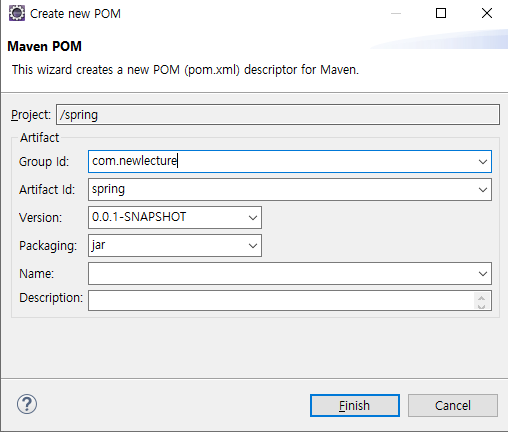
기존의 프로젝트를 Maven 프로젝트로 변경 필요

프로젝트명 우클릭 : Configure - convert to Maven Project

pom.xml파일이 자동 생성된다.


실제로 Maven Repositories를 편리하게 이용하기 위해 Window-view-Maven Repositories View - Global - Rebuild Index

이클립스 내에서 필요한 메이븐 라이브러리를 검색하여 바로 사용할 수 있다.


new - other

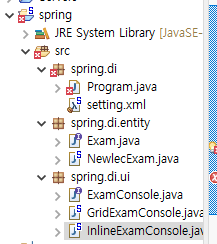
spring/di/setting.xml 생성했다. 여기서 xml파일의 이름은 임의의 이름, 변경 가능


지시서를 작성하기 이전 빈으로 만들 클래스에 필드와 setter, 생성자가 선언되어야 한다.


setter를 통한 초기화

property라는 태그명을 사용하여 setter설정

value와 ref속성은 배타적인데, 단순 값인지 다른 객체(빈)인지에 따라 선택하여 사용한다.


  <!--  Exam exam = new NewlecExam();과 같음-->
 <bean id="exam" class="spring.di.entity.NewlecExam">
      <property name="kor">        //방법1 : name따로 value따로
            <value>10</value>
      </property>
      <property name="eng" value="10"/>         //방법2: 태그 안에 한번에 name, value</bean> 

<!-- ExamConsole console = new InlineExamConsole(exam); -->
<bean id="console" class="spring.di.ui.InlineExamConsole">
      <!--console.setExam(exam);-->
      <property name="exam" ref="exam"/>        //단순 값이 아닌, 다른 빈(객체)을 매개값으로 가지기 때문에 ref
</bean>


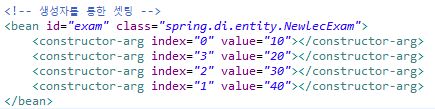
생성자를 통한 초기화

index, name, type 속성 사용가능하며, p태그를 이용하여 좀더 간단한 설정가능

NewlecExam.jva 파일에서 생성자

index 속성

생성자 선언 시의
매개변수 순서를 변경하거나 특정
name 속성

필드의 이름을 사용하여 매개변수 특정
type 속성

매개변수들의 타입 값이 다다를때 특정
p태그
태그 안에 한번에 지정
P태그 사용을 위해서는 xml파일 하단의 Namespaces탭에서 p 체크 필요


namespace [접두사] : 고유하게 해주는 식별자

① 태그가 특정 처리기에 의해 처리될 수 있도록 처리기를 특정

② 태그 이름을 식별  ex.같은 문서 안에 같은 이름의 bean이 둘 이상 존재할 때\

p, util이 하나의 namespace로 똑같은 태그를 작성하더라도 해당 namespace를 접두사로 사용하여 식별한다.


컬렉션 생성과 목록 DI

방법1
<!-- exams.add(new NewlecExam(1,1,1,1)); -->
<!-- 목록을 셋팅할때 사용, 단 그 자체로 객체를 만들지 못함 -->

<bean id="exams" class="java.util.ArrayList">
    <constructor-arg>
         <list>
             <bean class="spring.di.entity.NewlecExam" p:kor="1" p:eng="2"/> //새로 bean을 만들어 리스트에 추가
             <ref bean="exam"/>          //다른 빈을 참조하여 리스트에 추가
         </list>
     </constructor-arg>
</bean> 
방법2
<!-- util처리기를 사용하여 실제 객체를 생성, namespaces - util체크 -->
<util:list id="exams" list-class="java.util.ArrayList">
      <bean class="spring.di.entity.NewlecExam" p:kor="1" p:eng="2"/> //새로 bean을 만들어 리스트에 추가
       <ref bean="exam"/>          //다른 빈을 참조하여 리스트에 추가

</util:list>
사용 [ Program.java ]
List<Exam> exams = (List<Exam>) context.getBean("exams");        //id 값으로 꺼내 형변환 필요


어노테이션을 통해 의존성 주입


구현객체가 바뀔 때, 소스코드를 변경하지 않고 xml 설정만 변경할 수 있었음

그런데 객체가 바뀔 때 설정도 자동으로 바뀌면 더 좋을 것이라는 생각에 코드에 metadata를 심는 방식의 DI등장


어노테이션을 활용해 설정을 코드와 함께 가져가게 됨, 좀 더 진보적인 방식


@Component 스프링이 자동 객체화


@Autowired

스프링이 xml 파일가서 객체를 읽고, 해당 객체와 관련된 Autowired 들어간 setter를 찾아 IoC에 셋팅


기존의 방식

<!--참조할 객체-->
<bean id="exam" class="spring.di.entity.NewlecExam" p:kor="10" p:eng="10"/>

<!--exam 객체를 참조하는 객체 생성 -->
<!-- ExamConsole console = new InlineExamConsole(exam); -->
<bean id="console" class="spring.di.ui.InlineExamConsole">
	<!--console.setExam(exam);
	 <property name="exam" ref="exam"/>
</bean>


@Autowired사용할 때

xml파일

<!--참조할 객체-->
<bean id="exam" class="spring.di.entity.NewlecExam" p:kor="10" p:eng="10"/>

<!--exam 객체를 참조하는 객체 생성 -->
<bean id="console" class="spring.di.ui.InlineExamConsole"/>


--------------------------------
InlineExamConsole.java파일
	@Autowired
	@Override
	public void setExam(Exam exam) { this.exam = exam; }
    
---------------------------------
Program.java

		ApplicationContext context = 
				new ClassPathXmlApplicationContext("spring/di/setting.xml");
                
		ExamConsole console = context.getBean(ExamConsole.class);
		console.print();


기존 xml파일을 통한 DI
@Autowired 사용

① Namespaces - context 체크 후
② xml파일에서 <context:annotation-config/> beans태그 내 상단에 추가
③ <property ~> 주석처리
어떻게 지시서와 클래스 안의 setter함수와 바인딩이 일어날까?

스프링이 지시서를 읽을 때 객체를 생성해  IoC에 넣는다
<context:annotation-config/> 설정이 존재하면, 각각의 객체가 만들어질 때 그 안에 추가적인 어노테이션이 있는지 확인한다.

추가적인 어노테이션이 있으면 바인딩을 시도할텐데, 어떤 근거로 연결할까? 변수명? 타입?

 자료형을 기준으로 하되, 모호할 경우 bean의 id와 변수명을 매칭한다. 


- exam 객체가 생성되어 IoC에 담겨있는 상황
- console빈을 생성하면서 xml파일 안의 class명을 통해 @Autowired가 붙어있는 setter를 먼저 탐색한다.

- 변수명과 참조하는 bean의 id가 같지 않아도, 자료형이 일치하면 바인딩한다.
  setExam(Exam examObj)이라 가정하여 bean의 id값인 exam과 같지 않아도 여전히 Autowired는 작동한다.

 <bean id="exam" class="spring.di.entity.NewlecExam" p:kor="10" p:eng="10"/>

  ※ 자료형이 일치한다는 것은 구현 객체와 인터페이스 관계도 포함한다.
       아래의 예시를 통해 보자면 console 빈이 참조하고자 하는 exam빈은 NewlecExam이라는 클래스와 연결된다. 
       console빈이 연결하는 InlineExamConsole 클래스에서 @Autowired가 있는 setExam(Exam exam)은
       NewlecExam이 아닌 인터페이스 Exam을 매개변수로 가지고 있다.
       그럼에도 스프링은 IoC에 담겨있는 exam빈과 바인딩하여 해당 객체를 setter과 연결한다.

- 식별이 모호할때는 변수명을 사용하여 바인딩한다.
   xml파일 안에 같은 클래스를  객체 생성하는 bean이 두 개 이상 존재한다면, 이때 bean의 id옵션을  변수명과 매칭한다.

 <bean id="exam" class="spring.di.entity.NewlecExam" p:kor="10" p:eng="10"/>
 <bean id="exam2" class="spring.di.entity.NewlecExam" p:kor="30" p:eng="20"/>
  변수명(exam)값과 일치하는 id값을 가진 bean을  바인딩

- id값이 동일한 bean이 두 개 이상 존재한다면 Autowired이 불가능하다.

- id값이 변수명과 일치하지 않고, 자료형은 일치하는 bean이 두 개 이상 존재한다면 기본적으로 Autowired이 불가능하다.
 <bean id="exam1" class="spring.di.entity.NewlecExam" p:kor="10" p:eng="10"/>
 <bean id="exam2" class="spring.di.entity.NewlecExam" p:kor="30" p:eng="20"/>

- 보통 해당 구현 클래스에서 변수명을 변경하려고 할텐데, 이는 바람직하지 않다.
   @Qualifier 어노테이션을 사용하자.

@Autowired
@Qualifier("exam1")
@Overrider
public void setExam(Exam exam) { this.exam = exam; }

 <bean id="exam1" class="spring.di.entity.NewlecExam" p:kor="10" p:eng="10"/>
 <bean id="exam2" class="spring.di.entity.NewlecExam" p:kor="30" p:eng="20"/>


@AutoWired 인젝션 방법

1. 필드 위 : 기본 생성자 호출하면서 바인딩


2. setter 위 : setter를 호출하면서 바인딩


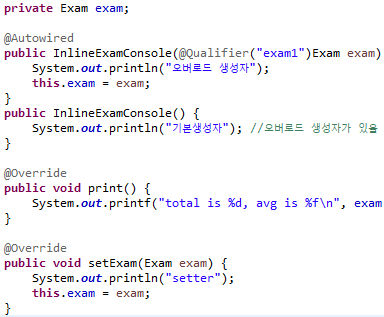
3. 생성자 위 :오버로드 생성자에서 바인딩

     오버로드 생성자라면 매개값을 두 개 이상 가질 수 있기 때문에, @Qualifier를 필드 앞에  선언한다.


@Autowired (required = false)

xml에 해당 객체가 존재하지 않아도 예외를 발생시키지 않고 기본값으로 처리할 수 있게 함


더보기
		/* 스프링에게 지시하는 방법으로 코드를 변경
		Exam exam = new NewlecExam();
//		ExamConsole console = new InlineExamConsole(exam); //DI
		ExamConsole console = new GridExamConsole();
		
		console.setExam(exam);
		*/
		
		//src가 루트가 됨
		/*지시서를 읽어 객체화한 후 컨테이너에 담으면 컨테이너의 이름 context*/
		ApplicationContext context = 
				new ClassPathXmlApplicationContext("spring/di/setting.xml");
		
//		Exam exam = context.getBean(Exam.class);
//		System.out.println(exam.toString());
		
		/*1. bean의 이름으로 꺼내려면 형변환 필요 */
//		ExamConsole console = (ExamConsole) context.getBean("console");
		
		/*2. type명으로 꺼내기 - ExamConsole형식의 참조될 수 있는 객체를 얻어옴 */
		ExamConsole console = context.getBean(ExamConsole.class);
		console.print();
		
//		
		System.out.println("=======");
		
//		List<Exam> exams = (List<Exam>) context.getBean("exams");
////		exams.add(new NewlecExam(1,1,1,1));
//		
//		for(Exam e : exams) 
//			System.out.println(e);


어노케이션을 이용한 객체생성

1. 클래스명 위에 어노테이션 @Component [('이름')]

    - 메인에서 이름으로 빈을 가져온다면 이름을 지정, 타입으로 가져온다면 생략 가능


2. xml파일 읽게 설정

     <context:component-scan base-package="spring.di.ui, spring.di.entity"/>

     이제  <context:annotation-config/> 는 지울 수 있다


3. 초기화는 필드위에 @Value("20")

   - 오른쪽 이미지는 예시일뿐 실제로는 Entity에 어노테이션을 사용하지 않는다.


@Component는 mvc방식으로 웹어플리케이션을 만들 때 업무형 로직을 가지고 있는 자바코드를 의미한다.
Controller, Service, DAO를 객체화하기 위해 사용되는 어노테이션으로, 역할로 보다 구체적인 의미를 부여할 수 있다.
  • @Controller : 사용자의 입출력
  • @Service : 사용자의 요구사항에 맞는 서비스 제공, 업무단위(Transaction단위)로 서비스 담당, 데이터 Service 위임받음
  • @Repository(Dao) : 데이터를 제공받음
  • 서비스와 컨트롤러를 연결하는 Model, Dao와 서비스를 연결하는 Entity에는 @Component 사용하지 않음


XML Configuration을 Java Configuration으로 변경하기

남의 코드거나, 자바에서 제공하는 코드 즉 개발자가 소스코드를 가지고 있지 않으면 @Component 사용이 불가하다.

그렇다면 xml파일을 여전히 병행해서 사용해야 할까? 아니다. 설정 또한 자바 코드 안에서 완료할 수 있다.

@ComponentScan("spring.di.ui")
@Configuration
public class NewlecAppConfig{
	@Bean
    public Exam exam(){ //exam : 컨테이너에 담기게 될 객체의 아이디 (함수처럼 생겼지만 기능형 함수와 다름)
    	return new NewlecExam();
    }
}

1. @Configuration : 설정파일임을 명시 

2. @ComponentScan("패키지명") : 스캔할 범위 설정 

      두 개 이상의 패키지를 설정하려면 배열 형태로 ComponentScan({"A","B"})

3. @Bean : 객체를 직접 생성하면 Bean 어노테이션을 통해 생성된 객체가 IoC컨테이너에 담긴다. 메소드명은 그 객체의 이름


설정방법1

ApllicationContext ctx = new AnnotationConfigApplicationContext(NewlecAppConfig.class)
ExamConsole console = (ExamConsole) context.getBean("console");
console.print();


설정방법2 : 여러 파일

AnnotationConfigApllicationContext ctx =
		new AnnotationConfigApplicationContext(NewlecAppConfig.class);
//ctx.register(AppConfig.class, Otherconfig.class);
ctx.register(NewlecAppConfig.class);
ctx.refresh();
ExamConsole console = (ExamConsole) context.getBean("console");
console.print();


'Spring > 스프링 프로젝트' 카테고리의 다른 글

프로젝트 import가 안될때  (0) 2021.07.04
프로젝트 구현 중 Mybatis  (0) 2021.06.29
프로젝트 구현 중 에러 정리  (0) 2021.06.24
뉴렉처 메이븐  (0) 2021.06.22
뉴렉처 스프링 AOP  (0) 2021.06.21